

For mileage and bike trips, claimexpenses.com supports automatically calculating the claim amount based on the journey distance.
Users with finance administrator permissions can configure this from the Finance tab of your organisation settings (under the "cog" menu on the navigation bar).
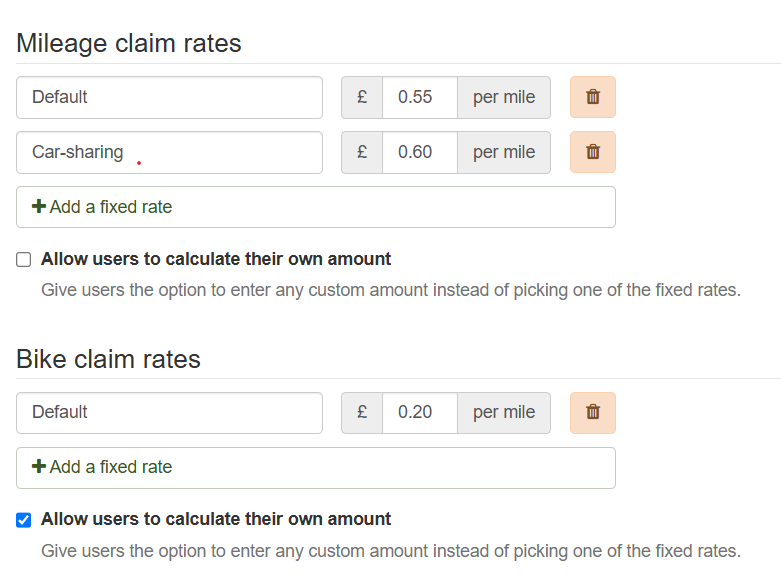
For each type of journey, you can configure:
Up to 5 fixed rates - for example if your organisation allows users to claim a higher rate when car-sharing, or has different rates for EVs or other types of vehicle.
Optionally, to allow users to calculate their own claim amount - for example, if you have complex rules such as a rate that varies over the length of the journey.
If you don't set any fixed rates, users will always have to calculate their own claim amounts. Otherwise, users will be prompted to choose between the available rates (or a custom amount, if enabled) as they add each item to their claim.
If a user picks a fixed rate, the system will calculate the amount to claim based on the distance they enter and they will not be able to change this.
The first rate you list will always be the default for new claim items.
Changes to mileage rates
Changes to mileage rates will only apply to items that are added to or edited on a draft claim after you make the change.
Items that have already been added - including on draft claims that are not yet submitted - will not be recalculated unless the claimant edits them.
Note: The system does not ever change mileage rates automatically (for example, if HMRC change the maximum approved tax-free mileage rates). Organisations may choose to follow the HMRC rates, or may have their own policies for higher or lower rates - therefore it's up to you to update your mileage rate configuration as required.