

You can control access to your organisation on claimexpenses.com via the "Users" tab of the organisation settings, accessible via the cog menu in the top right hand corner. You will need to be an administrator or finance administrator to access this page.
Any user can be a member of any number of organisations, and have different access levels in each. For example, Jenny could be a finance administrator in JennyDance - her own independent company - and an ordinary user in Scottish National Dance, where she occasionally works as a freelancer. When she logs in to claimexpenses.com, she'll be able to see her expenses claims to both organisations side by side, and her personal reports will include all her travel for both organisations.
Users can join your organisation in one of three ways:
They can register on the site with an email address matching a domain name that you've chosen to trust
They can use a guest link that you've configured and shared with them.
You can explicitly invite them by using the "New user" button at the bottom of the screen
Automatic membership for trusted domains
Automatic membership is useful if your staff are all issued with work email addresses, and you want everyone to be able to access the system and submit expenses claims. You can configure claimexpenses.com to recognise and trust any email address matching your normal work email domains, and users can then register and gain access automatically.
For example, if your staff usually get addresses like name@acme-arts.org you can enter "acme-arts.org" in the trusted domains field to allow anyone with this kind of address to register as one of your users. If your organisation uses more than one domain, that's fine - just add each one in your settings.
Users who register in this way will only have basic access to create, submit and view their own claims and reports. They cannot see any company-wide information except the list of projects and budgets you've configured on the expenses claim form.
You should not add generic email domains (gmail.com, etc) to your trusted list - this will allow people you don't know to submit claims to your organisation and may cause confusion.
Guest links
You can also provide automatic membership through guest links - anyone with the link will be able to join as a guest member and then create and submit claims. See the separate documentation on this.
Manually inviting users
If you don't want to allow automatic registration, or you want to add someone using their own personal or external email address, just click the "New user" button at the bottom of the user management screen. You can invite anyone with any email address this way - they'll receive a notification email and if they're new to claimexpenses.com that will include a link inviting them to click through to the system and choose a password.
When you invite users manually, you can choose their access level at the time you invite them.
Changing user permissions
There are three levels of access permissions on claimexpenses.com:
User - can submit claims and view reports on their own travel and expenses.
Admin - can also view reports for the whole company and manage normal user accounts. This might be an appropriate level for an environment officer / green champion.
Finance - can also process claims, edit submitted claims, and manage all settings and user accounts.
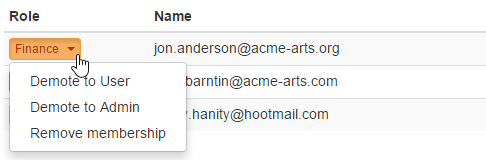
To change permissions for an existing user in your account, click the dropdown menu in the "Roles" column beside their name and select the appropriate action:
Removing users from your organisation
You can also remove a user's membership of your organisation with the dropdown menu in the "Roles" column of the user settings tab.
Users who have been removed from your organisation cannot edit or submit any expenses claims, view any organisation-wide reports, or access your settings.
They will however still be able to login to the claimexpenses.com system, and will have read-only access to their own submitted expenses claims and reports on their historical personal travel and expenses. This is because they may need access to these details for their own records.